
Searching for a Warrant in Andrews County
First identify the court. A City of Andrews traffic or ordinance citation belongs to Andrews Municipal Court. A county citation belongs to the JP precinct group named on the paper. County Court handles county misdemeanor files, while the 109th District Court and District Clerk are the felony route. No public Andrews County Sheriff warrant search was located.
For a city matter, start with the citation number and your date of birth. For other courts, provide your cause or citation number if you have it. Give identifying details only to the verified court or Sheriff contact. A search result is a lead to confirm, not a final court status.
- Use the Andrews Municipal Court portal only for an Andrews city citation or case.
- For county Class C or traffic matters, call JP Precincts 1/4 at 432-524-1412 or Precincts 2/3 at 432-524-1413.
- For a misdemeanor, contact the County Clerk at 432-524-1426; for a felony, contact the District Clerk at 432-524-1417 or District Court at 432-524-1419.
- Call the Sheriff at 432-523-5545 for county service or booking questions, or use its records form for existing Sheriff-held records.
- For a DPS license-renewal hold, ask the reporting court and use DPS/OmniBase for compliance questions. It cannot confirm a warrant.
Andrews County Municipal Warrant Portal
The online interface is labeled for Andrews Municipal Court. It does not claim to search JP, County Court, District Court, Sheriff, federal, or every active warrant record. Its name, citation, vehicle, license, and business controls are ways to locate city-court transactions, not a countywide roster.
The page offers a sign-in or registration control, but the search fields are visible before login. It gives no matching rules, result limit, or refresh schedule. If the result does not answer whether a warrant is active, call the court at 432-524-2791.
A result in the portal pertains to an Andrews city-court case. The page does not say it includes every historical citation or every later court order, so a clerk should confirm whether an entry reflects a current balance, a setting, or a warrant action.
Andrews County Warrant Search Privacy
The portal includes a Social Security number route, but the official materials do not mark it as required. Avoid entering a sensitive number unless the court directs it and you have checked the official URL. Name searches also require care because the portal does not explain exact or partial matching.
A vehicle plate search can locate a citation tied to a vehicle; it is not a general warrant search for everyone connected to that plate. A business-name field is separate from an individual’s court status.
Andrews County Warrant Search Fields
The official city interface lists six search families. The rendered form does not visibly mark required inputs, so “unspecified” is the accurate description. Use the citation number when available, then call the clerk if a field or match is unclear.
| Field Label | Type | Required | Notes |
|---|---|---|---|
| Citation number | Text | Unspecified | Date of birth is also shown; no citation format is stated. |
| First and last name | Text | Unspecified | Date of birth is shown; exact or partial matching is not explained. |
| Driver’s license | Text and state dropdown | Unspecified | Date of birth is shown; state options include Texas and other states. |
| Vehicle information | Plate and state | Unspecified | Search route for city-court citations tied to a vehicle. |
| Social Security number | Text | Unspecified | Date of birth is shown; sensitive route. |
| Business name | Text | Unspecified | Separate business-citation route. |
Use a case or citation number when one is printed on the document. If only a name is available, compare the birth date and charge before deciding that a row belongs to the same case. The portal does not publish partial-match rules or a searchable countywide index.
Andrews County Warrant Search No-Result Cases
An empty city search can mean a mistyped identifier, a different court, a sealed or restricted record, a delay, or a closed item that no longer appears in that view. Andrews does not publish search-result rules or an update cadence. Call Municipal Court when a city citation is missing or its status is unclear.
A city portal no-result is not proof that a JP, County Court, District Court, or Sheriff-held process does not exist. The source set inspected did not locate a countywide online search, so check the court named by the underlying notice.
What a Warrant Search Shows
No Andrews sample warrant result or public countywide field list was found. The city search offers citation and payment records, but its initial screen does not show what warrant, bond, judge, or status fields a matched result will contain. Ask the clerk to name the court and process type.
For a city case, compare the name and date of birth with the citation or court notice before asking what the portal entry means. For a county case, ask the clerk for the issuing court, cause number, process type, setting date, and any recorded service or return information. Do not assume a generic “open” or “closed” label answers whether another obligation remains.
If a record appears under a similar name, do not rely on that name alone. The court can compare the citation, birth date, charge, and cause number with its own file. The public site is a starting point for locating a city case, not an identity determination.
| Number | Andrews format not published; cite the ticket or cause number when calling. |
|---|---|
| Charge or citation | Confirm the offense and underlying citation with the issuing court. |
| Issuing court | Municipal, JP, County, District, or another named court. |
| Bond or balance | Not displayed in a local sample; request the current case-specific amount. |
| Status | Ask whether active, served, recalled, or closed; no public status-code key was located. |
Where to Check Warrants in Andrews County
Andrews County records are split by court level. The County Clerk keeps County Court misdemeanor files; the District Clerk handles 109th District Court felony records. The two JP contacts handle their precinct cases. Andrews Municipal Court controls city citations, and the Sheriff answers county law-enforcement and service questions.
Texas has no public statewide active-warrant lookup. DPS/OmniBase handles certain reported FTA/FTP citation issues for license renewal, but DPS tells callers to contact the issuing court and says its license specialists cannot confirm warrants.
A license-renewal restriction can therefore coexist with an unanswered warrant question. Ask the court whether it reported a compliance issue, whether a separate warrant exists, and what proof of compliance it sends to DPS. The answer to one of those questions does not automatically resolve the others.
The County Clerk at 432-524-1426 handles County Court records, the District Clerk at 432-524-1417 handles district filings, and the 109th District Court can be reached at 432-524-1419. Use the court name on the notice to choose among them.
Texas Has No Public Andrews Warrant Database
Texas does not offer a public statewide active-warrant search that combines Andrews Municipal Court, the two JP groups, County Court, District Court, and federal matters. A name search on an outside site may return arrest, jail, or court references, but those records do not establish an active warrant with the issuing judge.
DPS’s FTA/FTP program is a driver-license compliance route for certain unanswered or unpaid citations. It is not a warrant roster, and DPS directs people to the court that reported the citation for case-specific information. When the question is a warrant, ask the issuing clerk or responsible agency directly.
Andrews County Sheriff Warrant Records Request
When a record is not online, use the Sheriff’s official Open Records Request form for records that office holds. The rendered form asks what documents are requested and includes a non-confidential certification, signature, contact, and upload fields. It does not show a warrant-specific fee, response estimate, or identity rule.
Ask for a fee estimate before chargeable copying. A narrow request for your own status, process type, issuing court, and service or return information is clearer than asking for every warrant in the county. The official Sheriff form may be subject to lawful withholding or redaction.
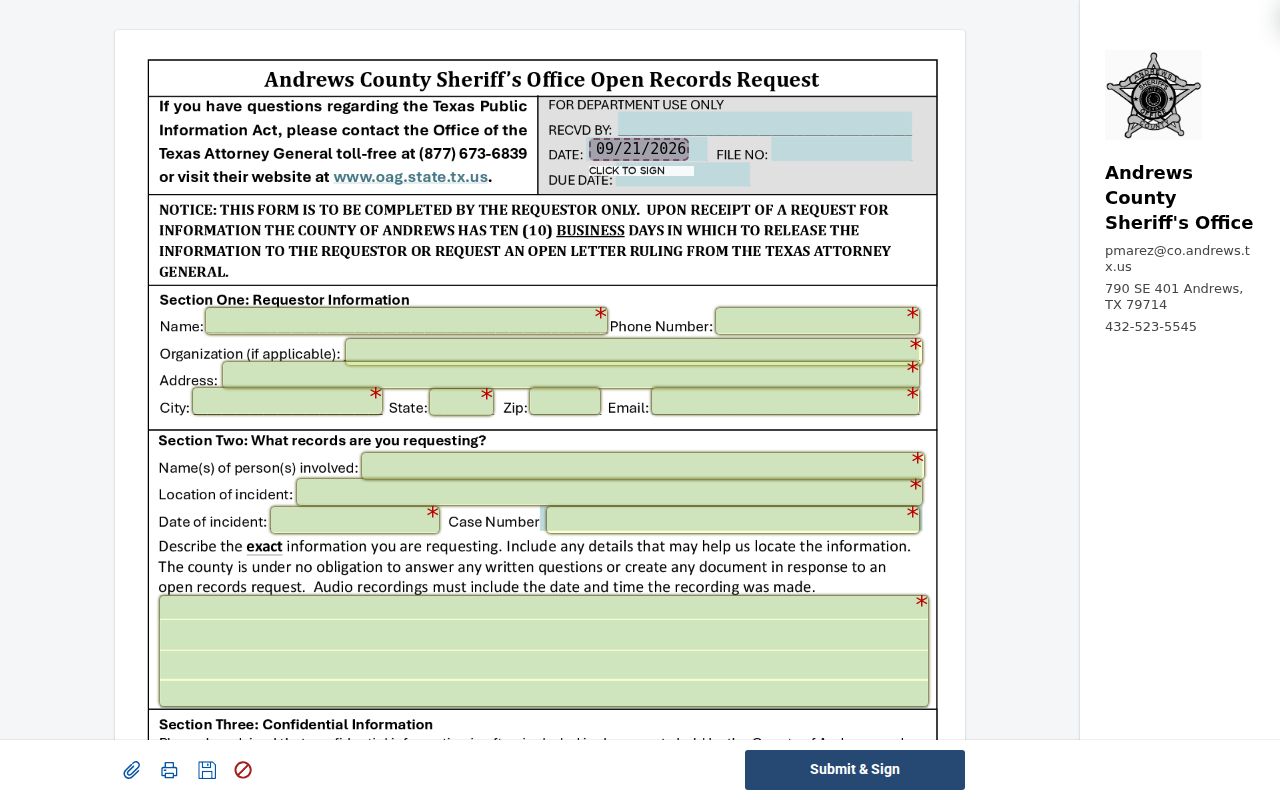
A records response describes Sheriff-held information; it does not replace a court clerk’s answer about a separate court file.
If the requested document concerns an arrest or service event, identify the approximate date and the type of record sought. Avoid asking for every person or every warrant in the county when a single cause or incident is at issue. A precise request is easier for the custodian to route.
Restricted Warrants and Access Rules
Public access depends on who holds the record and whether a law or court order limits release. Texas Public Information Act requests concern existing government records, but law-enforcement exceptions can apply. Juvenile arrest warrants and supporting complaints have a separate confidentiality rule. A sealed matter may not appear in an online view.
Key Rules:
Texas Government Code Chapter 552 allows access to public information while preserving statutory exceptions.
Texas Family Code §58.010 makes a child’s arrest warrant and supporting complaint confidential except for authorized disclosures.
A missing online result can reflect another court, a sealed record, or a timing gap. Confirm with the issuing clerk.